

Quality NAS-C01 PDF Dumps - NAS-C01 Exam Questions
Most UptoDate Snowflake NAS-C01 Exam Dumps PDF 2026
NEW QUESTION # 225
Your Snowflake Native Application, 'Advanced Analytics Suite', utilizes dynamically generated SQL queries based on user input. To prevent SQL injection vulnerabilities when publishing this application, which of the following coding practices should you implement?
- A. Rely solely on Snowflake's built-in security features and assume they automatically prevent all SQL injection attempts.
- B. Use parameterized queries (also known as prepared statements) to separate SQL code from user-supplied data, treating user input as data rather than executable code.
- C. Sanitize all user inputs using Snowflake's built-in functions like 'regexp_replace' or 'replace' to remove potentially harmful characters or SQL keywords.
- D. Limit user input to a predefined set of options through dropdown menus or radio buttons to avoid arbitrary SQL code injection.
- E. Enclose all dynamically generated SQL queries within a 'TRY...CATCH' block to catch and handle any potential SQL injection errors.
Answer: B,C,D
Explanation:
Parameterized queries are the most effective way to prevent SQL injection. Sanitizing input also mitigates the risk. Limiting user input to a defined set is useful in general for usability and for SQL injection. Snowflake's built-in features do not prevent against this. 'TRY...CATCH' doesn't prevent injection, but rather catches it after the attempt.
NEW QUESTION # 226
A Native Application package contains a secure view that exposes customer dat a. The application provider wants to ensure that only the application itself, and not the consumer's roles, can access the underlying table. They have granted OWNERSHIP on the table to the application. Which of the following SQL statements would be MOST effective in managing privileges so that the application package can securely access customer data and consumers cannot directly access it via their own roles?
- A. GRANT SELECT ON TABLE .. TO APPLICATION PACKAGE;
- B. REVOKE ALL PRIVILEGES ON TABLE .. FROM ROLE PUBLIC; GRANT SELECT ON TABLE .. TO APPLICATION PACKAGE;
- C. No additional privileges are needed as the application package has ownership of the object.
- D. GRANT SELECT ON TABLE .. TO APPLICATION ROLE ;
- E. GRANT SELECT ON TABLE .. TO APPLICATION PACKAGE; REVOKE SELECT ON TABLE FROM ROLE PUBLIC;
Answer: C
Explanation:
Ownership automatically grants all privileges, so no additional GRANT statement is necessary and would, in fact, be redundant. Ownership grants are the ideal security model, and leveraging this fact is key in securing a native app. Option E is correct; the ownership already ensures access for the application while blocking direct consumer access.
NEW QUESTION # 227
A Snowflake Native App developer encounters an issue where the application fails to install on a consumer's account due to insufficient privileges. The developer has verified that the necessary privileges are declared in the application. privileges section of the manifest file. However, the installation still fails. What could be the most likely cause of this issue, and how can it be resolved?
- A. The consumer's account does not have the SNOWFLAKE.APP_INSTALLER role enabled. Ensure this role is granted to the appropriate user.
- B. The consumer account has object level grants conflicting with the required grants. Revoke the object level grants and try again.
- C. The privileges declared in the manifest file are not supported by the consumer's Snowflake edition. Review and adjust the required privileges.
- D. The consumer's account is not on the same Snowflake region as the provider account. Verify and align the regions.
- E. The privileges were declared in the manifest file, but were not actually granted to the application role in the provider account before creating the version. Grant the declared privileges to the application role using GRANT ON ACCOUNT TO APPLICATION ROLE and create a new version.
Answer: E
Explanation:
Even if the privileges are declared in the manifest file, they must be explicitly granted to the application role in the provider account before a new version is created. The consumer's Snowflake edition might not support all privileges (but the error would be slightly different), SNOWFLAKE.APP INSTALLER role does not exist , regional difference does not matter as such if provider created version after granting the privileges. The application's role in provider account needs required permission using GRANT ON ACCOUNT TO APPLICATION ROLE .
NEW QUESTION # 228
A Snowflake Native App provider is designing an application. Select ALL of the necessary privileges a provider needs on an Application Package to successfully list, version and distribute the native application to consumer accounts?
- A. USAGE
- B. APPLY
- C. MONITOR
- D. IMPORTED PRIVILEGES
- E. OWNERSHIP
Answer: B,E
Explanation:
The provider requires OWNERSHIP to manage the application package and APPLY to create versions and authorization grants, and IMPORTED PRIVILEGES is a privilege granted TO the consumer from the provider, not required to be owned by the provider. MONITOR is more applicable to usage monitoring and debugging, not core distribution privileges.
NEW QUESTION # 229
You are developing a Snowflake Native Application that utilizes a Streamlit frontend. The application requires access to specific data in the consumer account. You've already defined the necessary roles in your provider account. Which of the following steps are absolutely necessary to grant the Streamlit application the appropriate permissions to access the consumer's data? Assume the provider account has already shared the application package.
- A. Within the application package installation script, grant the necessary privileges (e.g., 'SELECT on tables) directly to the 'APPLICATION' object representing the installed application using 'GRANT ON TO APPLICATION In the consumer account, no further privilege grants are required. Also ensure to 'GRANT APPLICATION ROLE app_public TO APPLICATION'
- B. In the consumer account, create a new application role and grant the necessary privileges (e.g., 'SELECT on tables) to this role. In the Streamlit code, use streamlit.experimental_get_query_params()' to pass the role name as a query parameter to the application.
- C. In the consumer account, grant the 'IMPORTED PRIVILEGES privilege on the application package to a role that Streamlit will assume. Ensure the Streamlit application has code to execute 'snowflake.connector.connect()' with the correct consumer account credentials.
- D. Create a new database role in the provider account and grant the necessary privileges (e.g., 'SELECT on tables) to this role. Share this database role to the consumer account using secure data sharing. No code changes are needed in the Streamlit application.
- E. Define an application role in the application package and grant the necessary privileges within the package installation script using 'GRANT APPLICATION ROLE TO SHARE. In the consumer account, grant the application role to a user. No code changes are needed in the Streamlit application. Ensure to also grant the application role to the application in the install script with 'GRANT APPLICATION ROLE TO APPLICATION
Answer: A,E
Explanation:
Options C and E are the most accurate. Option C is correct because it leverages application roles, which are the recommended way to manage privileges in Snowflake Native Apps. Granting the application role to a user in the consumer account allows them to access the data via the application. Option E is correct because granting privileges directly to the 'APPLICATION' object is essential for the application to function correctly with its own access rights. Additionally, granting 'app_public' ensures basic functionality is available to the application. Option A is incorrect because applications should not be connecting to the database using standard connectors with explicit credentials in Native Apps. Option B is incorrect because passing role names as query parameters is not a secure or recommended practice. Option D is incorrect because sharing a database role directly is not the appropriate mechanism for granting access within a Snowflake Native App. The application package and its associated roles should manage the access.
NEW QUESTION # 230
You are developing a Snowflake Native Application that manages customer dat a. You need to ensure that updates to customer records are idempotent. Your application uses a stored procedure 'update_customer(customer_id INT, new_email VARCHAR)' to update customer emails. How can you modify this procedure to guarantee idempotency, assuming that customer data changes are tracked with a 'last_updated' column of type TIMESTAMP NTZ?
- A. Create a separate table to store only the changes to customer emails and query this table to determine the latest email.
- B. Use ' MERGE statement, comparing the new email with the existing email and updating only if they are different, while also ensuring that the update only happens if the new ' last_updated' timestamp is later than the stored one.
- C. Enclose the entire stored procedure within a 'TRY...CATCH' block and retry if any exception occurs.
- D. Add a 'COMMIT statement at the end of the stored procedure to ensure all changes are persisted immediately.
- E. Implement optimistic locking using a version number for each customer record and checking the version before updating.
Answer: B
Explanation:
Option C leverages the 'MERGES statement for idempotent updates. By comparing the existing and new email and only updating if different, and comparing the Alast_updated' timestamp, it prevents redundant updates if the procedure is called multiple times with the same input. Optimistic locking (A) is a valid concurrency control mechanism but doesn't directly guarantee idempotency in this scenario. 'COMMIT (B) affects transaction behavior, not idempotency. Creating a separate table (D) adds complexity but doesn't inherently ensure idempotency of the update_customer' procedure itself. 'TRY...CATCH& (E) provides error handling but doesn't address idempotency.
NEW QUESTION # 231
A data science team is developing a Snowflake Native Application that provides predictive analytics for financial institutions. The application requires access to usage data from consumer accounts, but only aggregated and anonymized data should be exposed. As the application provider, you need to grant the necessary privileges while adhering to the principle of least privilege. Which combination of global privileges and application logic will achieve this?
- A. Grant the IMPORTED PRIVILEGES global privilege on the account and rely on data sharing agreements to control access to the aggregated and anonymized data.
- B. Create a custom role with the MONITOR USAGE global privilege, grant this role to the application, and use secure views within the application to expose only the aggregated and anonymized data.
- C. Grant the USAGE global privilege on the account and implement stored procedures within the application that perform the aggregation and anonymizatiom
- D. Grant the READ global privilege on the account metadata and use Snowflake's masking policies within the application to anonymize sensitive data.
- E. Grant the ACCOUNTADMIN role to the application and rely on the application code to filter and anonymize the data.
Answer: B
Explanation:
Granting the MONITOR USAGE global privilege to a custom role and then granting that role to the application is the most appropriate approach. This adheres to the principle of least privilege by only granting the necessary privilege. Secure views provide an additional layer of security and data governance by controlling exactly what data is exposed to the application, ensuring that only aggregated and anonymized data is accessible. Options A, B, D, and E either grant excessive privileges or rely on application code for security, which is less secure than using Snowflake's built-in features.
NEW QUESTION # 232
You are developing a Snowflake Native Application package that provides a set of UDFs for data transformation. The UDFs require specific Snowflake privileges to access data in consumer accounts. Which of the following methods can ensure your application has the necessary privileges when installed in a consumer account? (Choose all that apply)
- A. Use 'GRANT OWNERSHIP' to grant the APPLICATION role ownership of the target objects in the consumer account.
- B. Create a separate role in the consumer account and grant the necessary privileges to that role. Have the application assume this role.
- C. Request the required privileges in the application package manifest file ('manifest.yml'
- D. Leverage 'GRANT APPLICATION ROLE ... ON ..: statements in the setup script to grant the APPLICATION role the required privileges.
- E. Instruct consumers to manually grant the necessary privileges to the APPLICATION role after installation.
Answer: C,D
Explanation:
The application package 'manifest.yml' file is where you declare the resources your application needs and the privileges it requires. The 'GRANT APPLICATION ROLE ON statement, executed during the setup script, is the correct way to grant the APPLICATION role the necessary privileges on objects in the consumer account. Requiring consumers to manually grant privileges is not a scalable or secure solution. 'GRANT OWNERSHIP is generally not necessary or recommended as it gives the application full control over the object. Creating a separate role in the consumer account and having the application assume it is an overly complex solution when 'GRANT APPLICATION ROLE is available.
NEW QUESTION # 233
A Snowflake Native App developer is creating an application that accesses a secured table 'CUSTOMER DATA' within the provider's account. The developer wants to grant the consumer read-only access to this table through the application, but only after the application is installed and the consumer has accepted the terms and conditions. Which of the following steps are necessary to achieve this goal? (Choose two)
- A. Define a stored procedure within the application package that, upon execution in the consumer account (post-installation), executes a 'GRANT SELECT ON TABLE CUSTOMER_DATA TO APPLICATION ROLE app_role' statement. The application itself doesn't directly share the data; the procedure manages the access.
- B. Create a share from the provider account containing the 'CUSTOMER_DATA table and grant the consumer account access to this share using the Snowsight UI, specifically setting the ' READ ONLY' privilege on the table after the application is installed.
- C. Create an outbound share within the application that shares the 'CUSTOMER DATA' table with a specific application role. Configure an activation hook that runs post-installation to grant the 'SELECT' privilege on the table to the application role using the 'GRANT' command.
- D. The provider creates a versioned schema in the listing and shares it with the consumer account. Once the consumer accepts the terms and conditions, the provider executes 'GRANT SELECT ON TABLE CUSTOMER_DATA TO APPLICATION ROLE app_role' within the consumer account using a secure UDF.
- E. Define a manifest file within the application package that specifies the 'CUSTOMER DATA' table as a resource and declares the 'SELECT privilege required by the application. Snowflake automatically grants this privilege to the application's default role upon installation.
Answer: A,C
Explanation:
Option B is correct because it leverages a stored procedure executed in the consumer account to grant the required privilege to the application role. This allows for conditional granting post-installation. Option D is also correct because it uses an outbound share and activation hook, which is a standard mechanism for granting access to objects in the provider account to application roles in the consumer account after the application is installed.
NEW QUESTION # 234
You've deployed a Snowflake Native Application to the Marketplace. A consumer reports an issue, and after investigating, you suspect a vulnerability related to SQL injection within a stored procedure. You want to implement best practices to mitigate this risk. Which of the following strategies are recommended to secure the stored procedure against SQL injection?
- A. Use parameterized queries or prepared statements whenever possible to prevent user input from being directly interpreted as SQL code.
- B. Encode all user input before inserting it into SQL queries to neutralize potentially harmful characters.
- C. Disable all external network access from within the stored procedure environment.
- D. Grant 'OWNERSHIP' privilege to the stored procedure to prevent unauthorized modifications.
- E. Implement strict input validation and sanitization to ensure that user input conforms to expected data types and patterns.
Answer: A,B,E
Explanation:
SQL injection vulnerabilities arise when user input is incorrectly incorporated into SQL queries. Parameterized queries (A) and input validation/sanitization (B) are crucial defenses. Parameterized queries treat input as data, not code, preventing injection. Input validation ensures only expected data reaches the query. Encoding user input (D) neutralizes harmful characters that could be exploited. Granting 'OWNERSHIP' (C) is for access control, not injection prevention. Disabling network access (E) might improve overall security but doesn't directly address SQL injection within the procedure.
NEW QUESTION # 235
You are developing a Snowflake Native Application that utilizes Streamlit for its user interface. The application needs to access data from a protected table within the provider account. To enhance security, you want to grant specific privileges to the Streamlit application without exposing the underlying table directly. Which of the following steps are necessary to achieve this, ensuring the principle of least privilege?
- A. Create an API integration, implement a service (e.g., AWS Lambda) that queries the data and grant 'USAGE on the API Integration and appropriate permissions on the service to the Streamlit application's role.
- B. Use an external function (UDF) owned by the application to query the protected table and grant USAGE' privilege on the UDF to the Streamlit application's role.
- C. Create a stored procedure with 'EXECUTE AS CALLER which queries the protected table and grant 'USAGE privilege on the procedure to the Streamlit application's role.
- D. Grant 'SELECT privilege directly on the protected table to the Streamlit application's role.
- E. Create a secure view on the protected table and grant 'SELECT privilege on the secure view to the Streamlit application's role.
Answer: B,C,E
Explanation:
Granting 'SELECT directly to the Streamlit appos role is against the principle of least privilege (A). Using a secure view (B), a UDF (C) or stored procedure (E) allows you to control precisely what data is exposed and under what conditions. API Integration will work. The service function (Lambda, etc) would then require permissions to query Snowflake. EXECUTE AS CALLER allows the procedure to run with the rights of the caller.
NEW QUESTION # 236
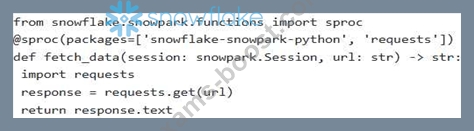
Your Snowflake Native Application needs to integrate with an external Python library (e.g., 'requests' ) to fetch data from a third-party API. You have packaged the library using Anacond a. How do you correctly reference and use this external library within a Python UDF in your application?
- A. Use 'snowflake.ingest.SimplelngestManager' to manage the library dependencies within the application's metadata.
- B. Import the library directly in the UDF code using 'import requests'. Snowflake automatically handles external dependencies.
- C. Create a stage to store the Anaconda packages and reference them when calling the UDF from Streamlit.
- D. Install the 'requests' library on each Snowflake virtual warehouse used by the application.
- E. Specify the library in the 'imports' clause when creating the UDF using the opackageS decorator. For example:
Answer: E
Explanation:
Snowflake uses Anaconda for managing Python dependencies in UDFs. The correct way to specify external libraries is through the packages parameter in the '@sproc' decorator or when creating a UDF using 'CREATE FUNCTION'. Directly importing without specifying the package or managing it manually (C, D, E) will lead to A is wrong since the library has to be explicitly declared as a dependency.
NEW QUESTION # 237
You are developing a Snowflake Native App that utilizes Streamlit for its user interface. You want to control the app's behavior based on whether it's running in a development environment within your provider account or in a consumer account after installation. Which of the following methods can you use within your 'streamlit.py' to determine the current execution context (Provider vs. Consumer) reliably?
- A. Examine the session context function 'CURRENT ACCOUNT()' function and compare it with the provider account identifier, if matches then it is a provider. It is the best method.
- B. Query the view. Presence in this view indicates a provider environment.
- C. Read an environment variable set during the application installation process by the consumer.
- D. Use which is a function specifically designed to check if the app is running in a consumer account.
Answer: A
Explanation:
Using session context function such as and comparison with the provider account identifier is the most reliable way to determine if the app is running in the provider account. does not exist, and querying INFORMATION_SCHEMA.APPLICATIONS is designed for a different purpose.
NEW QUESTION # 238
A Snowflake Native App is designed to perform complex data transformations on large datasets provided by the consumer. To optimize performance and manage resource consumption, you need to choose the appropriate execution context for your application logic. Which of the following options should be considered to accomplish this?
- A. Distributing the transformations across multiple SQL UDFs running in parallel using Snowflake's compute grid.
- B. Using a combination of stored procedures, SQL UDFs, and external functions to orchestrate the data transformation process, depending on the specific requirements of each step.
- C. Leveraging Snowflake's external functions to offload data transformations to a separate cloud-based compute environment.
- D. Run entire process by calling API from provider side.
- E. Executing all data transformations within a single stored procedure to minimize overhead.
Answer: B
Explanation:
Choosing the correct execution context for your application logic requires a combination of stored procedures, SQL UDFs, and external functions to orchestrate the data transformation process, depending on the specific requirements of each step, offering the best balance of performance, scalability, and resource management. A single stored procedure may not be efficient for complex transformations. SQL UDFs in parallel can be effective but might have limitations depending on the complexity. External functions offer flexibility for offloading but introduce latency and complexity. API call will be more appropriate to transfer the data.
NEW QUESTION # 239
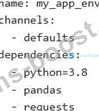
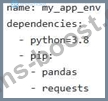
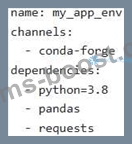
You are developing a Snowflake Native Application that includes a Python module for data transformation. This module relies on the pandas' and 'requests' libraries. You are using an 'environment.yml' file to manage dependencies. Which of the following 'environment.yml' configurations is the MOST secure and correct way to define these dependencies for your application? Assume you want to install these packages directly from conda-forge channel.
- A.
- B.
- C.
- D.
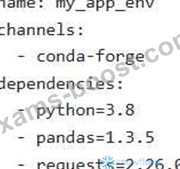
- E.
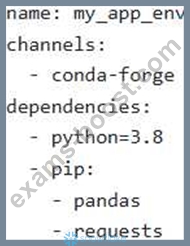
Answer: D
Explanation:
Option E is the MOST secure and correct. Here's why: Specifying Versions: Explicitly pinning the versions of 'pandas' and requests' (e.g., 'pandas=l .3.5' , ensures consistent behavior across different environments and prevents unexpected issues caused by updates to these libraries. This greatly enhances the reproducibility and stability of your application. Using conda-forge Channel: Specifying 'conda-forge' as the channel is generally recommended for Snowflake Native Apps as it provides a broader selection of packages and often includes versions compatible with the Snowflake environment. It also tends to have more up-to-date packages. Avoiding 'pip': While 'pip' can be used, it's generally better to use 'conda' for managing dependencies in a 'environment.ymr file as it can handle non-Python dependencies as well and integrates better with Conda environments. Option A is less desirable because it relies on 'pip' without a specified channel, which can lead to inconsistencies and potential security vulnerabilities. Option B is better than A because it uses conda-forge but lacks version pinning. Option C uses 'defaults' channel which is less preferable to conda-forge and lacks version pinning. Option D unnecessarily mixes pip with the Conda package manager.
NEW QUESTION # 240
Which of the following statements regarding warehouse sizing and configuration for a Snowflake Native Application are true?
- A. Warehouse size cannot be changed after it is created.
- B. A larger warehouse size always guarantees faster query execution, regardless of the query's characteristics.
- C. The parameter determines if the warehouse is used for data loading vs query processing.
- D. The 'AUTO SUSPEND' parameter controls how long a warehouse remains active after executing queries, impacting cost.
- E. The 'MAX CONCURRENCY LEVEL' parameter helps manage the number of queries that can be executed concurrently on the warehouse.
Answer: D,E
Explanation:
Warehouse size can be changed after creation using 'ALTER WAREHOUSE statement. A larger warehouse is not always faster; it depends on the query's design and data volume. The 'AUTO SUSPEND' parameter is crucial for cost control as it determines the idle time before automatic suspension. While Snowflake has virtual warehouses, the ' WAREHOUSE_TYPE parameter doesn't exist. 'MAX CONCURRENCY LEVEL' is essential for managing concurrent queries and preventing resource contention, improving overall application performance.
NEW QUESTION # 241
You are troubleshooting a Snowflake Native Application installation that consistently fails with a cryptic error message: 'Internal Application Error: Check application logs for details'. You have access to the application's code package but are unsure how to effectively gather detailed logs and telemetry data from the running application. Which strategy would provide the MOST comprehensive and maintainable observability solution within the Snowflake Native App framework?
- A. Integrate a third-party logging framework (e.g., Log4j) into the application code and configure it to write logs to an external logging service accessible over the internet.
- B. Rely solely on the error messages returned by Snowflake during application execution, as these are sufficient for identifying most installation issues.
- C. Leverage Snowflake's event tables and configure the application to emit custom events to these tables. Consumers can then subscribe to these events to monitor application behavior.
- D. Implement calls within the application code to write log messages directly to a Snowflake table owned by the application provider. Consumers can then query this table to view logs.
- E. Utilize the view to analyze query execution patterns and identify potential bottlenecks within the application's SQL code.
Answer: D
Explanation:
Option A is the most comprehensive and maintainable solution. 'SYSTEM$LOG' provides a native and secure mechanism for writing logs directly to a Snowflake table controlled by the application provider. This avoids the complexity and security risks of using external logging services (C) and provides structured, queryable log data within the Snowflake environment. B is helpful for performance, D is good, but not a native way. E relies on just error messages.
NEW QUESTION # 242
You are developing a Snowflake Native Application that utilizes a custom stage for storing large intermediate datasets during processing. Your CI/CD pipeline involves automated testing in a dedicated testing account. To ensure proper isolation and prevent interference with production data, how should you configure the stage path within your application package version definition, considering the stage name might differ between development and test environments?
- A. Define the stage path as a parameter in the application installation script. When installing the application in each environment, pass the correct stage path as an argument.
- B. Use a Snowflake Secret to store the stage path and retrieve it dynamically during application installation. The secret's value will be environment-specific.
- C. Utilize Snowflake's and 'CURRENT functions in conjunction with conditional logic within the application to derive the stage path based on the environment.
- D. Hardcode the stage name and path directly within the setup script of the version. This approach is simple and ensures consistent access across environments.
- E. Employ a versioned configuration file (e.g., YAML) within the application package. The CI/CD pipeline should replace placeholders in the configuration file with environment-specific stage paths before creating the version.
Answer: B,E
Explanation:
Options B and C are the most appropriate. Using a Snowflake Secret (B) allows for secure and environment-specific storage of sensitive information like the stage path. Versioned configuration files (C) offer a structured way to manage environment-specific configurations and enable easy replacement via CI/CD pipelines. Option A is not recommended due to the lack of flexibility and potential for errors. Option D might be feasible, but is less maintainable than options B and C. Option E requires manual intervention during install in each env, defeating the purpose of CUCD.
NEW QUESTION # 243
You've built a Snowflake Native Application and are ready to test it in test mode. The application utilizes both internal stages and external stages for data storage. Which of the following statements accurately describe the behavior of stages and data access during test mode installations from the provider's perspective?
- A. External stages, regardless of their access permissions, are inaccessible during test mode installations to prevent unintended data leakage.
- B. Data loaded into internal stages during test mode is automatically persisted to the consumer's account upon final installation of the application.
- C. The provider can configure specific external stages to be accessible in test mode by granting appropriate privileges to the application role and explicitly defining these stages in the setup script.
- D. During test mode, the provider has full access to all data stored in both internal and external stages associated with the application, mimicking the access rights in a production environment.
- E. Internal stages defined within the application package are accessible to the application code running in test mode. Data placed in these stages before installation is available immediately.
Answer: C,E
Explanation:
Option A is correct because internal stages are accessible in test mode, allowing providers to pre-populate data for testing. Option C is correct because external stages can be configured for access with proper permissions. Option B is incorrect, as external stages can be accessed. Option D is incorrect because test mode data doesn't persist to consumer's account automatically. Option E is partially incorrect; the Provider must configure the external stages.
NEW QUESTION # 244
You are developing a Snowflake Native Application that uses Streamlit for its user interface. The application needs to access a custom Python module named 'my_module' which resides within your application package. You have correctly packaged the module. However, when running the Streamlit application, you encounter an 'ImportError: No module named What is the most likely reason for this error and how can you resolve it?
- A. The 'my_module' is not included in the file for your application package. Add it to the 'packages' list in 'setup.py'.
- B. The correct handler is not specified in the 'manifest.ymr file.
- C. The 'my_module' is not located in the correct directory structure within the application package. Ensure it's placed in the 'src' directory (or the directory specified in 'package-name' in 'setup.py') and the directory structure mirrors the package structure required for import.
- D. The Streamlit application is not aware of the application package's Python environment. You need to set the environment variable within the Streamlit application to point to the directory containing 'my_module'.
- E. Streamlit does not support custom Python modules within Snowflake Native Applications. You must use only built-in Python modules or those available through Anaconda.
Answer: C
Explanation:
The most likely reason for the 'ImportError' is that the Python module is not located in the correct directory structure within the application package. When you build your application package, Snowflake expects your Python code to reside in a specific directory structure, typically the 'src' directory (or as configured in 'setup.py'). If the module is not in this structure or the correct package structure is not present, the Streamlit application will not be able to find it during import. Option A is incorrect, setup.py is for installation not direct packaging. Option B setting PYTHONPATH is not supported. Option D is incorrect, Custom Modules are supported by Streamlit. Option E is incorrect, as it has nothing to do with the module location and packaging.
NEW QUESTION # 245
......
100% Free SnowPro Core Certification NAS-C01 Dumps PDF Demo Cert Guide Cover: https://www.exams-boost.com/NAS-C01-valid-materials.html
PDF Exam Material 2026 Realistic NAS-C01 Dumps Questions: https://drive.google.com/open?id=1r_seTgP8rT-3Y7kZvUPSY_XeiYc5nbPz